Ask
Describe the change. The agent works your layer only. The kit you rent stays read-only, so a commit cannot contain kit code.
nventr App Kit
A URL, a database, and a layer you own. Dev Console is how you change it: ask, review the diff, deploy. People open it on desktop and phone in the browser. The instance is $149/mo.
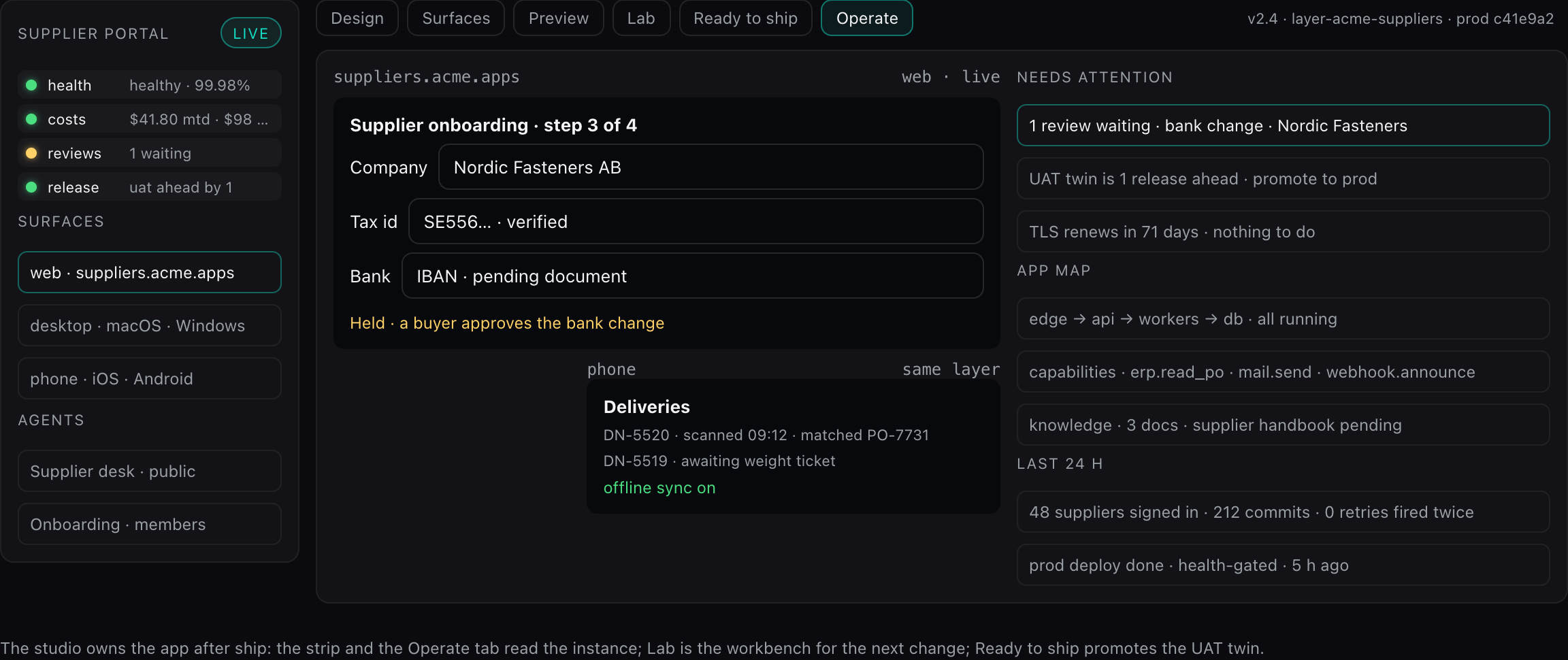
Dev Console is not a separate product you add later. It is the build loop on the instance. Platform does not include it. Kit Site at $15 is a public site and does not include it either. Kit does.
Describe the change. The agent works your layer only. The kit you rent stays read-only, so a commit cannot contain kit code.
You read the diff before anything merges. Nothing from the agent ships unseen.
Ship to a preview, then to the live app. Your users keep the same URL. The foundation you rent is unchanged.
The license is a foundation already built for large files, heavy jobs, and a signed-in product, then watched, hardened, and updated. Your layer sits on top of it. Dev Console changes that layer. Standing the same path up yourself means paying to rebuild the upload path, the health-gated deploy, and the security boundary, then living with the gaps that work has already closed.
Browsers send large files straight to storage, in parallel parts, and play them back from signed links. Heavy jobs fan out across short-lived tasks so the request path stays short. A public site, a media-heavy product, and a signed-in operation share that path. Kit Business and Kit Enterprise add SAML, more capacity, and more instances. They run the same foundation.
A deploy stays dark until the new task passes its health check. The task already serving keeps the app up until then, so work in flight is not dropped. After launch the instance keeps reporting health.
Database access is scoped to the signed-in user. Secrets resolve on the server — not in the page, not in git. A change that steps outside your layer fails the build. You read the diff before it deploys.
Patches and foundation updates ship on the kit you rent. They do not commit into your repo. Your pages, workers, and data stay the layer you own, and the layer you can export.
That standing work is inside the license. Dev Console is how you change the app on top of it — ask, review, deploy — without rebuilding the platform underneath each time the product needs a change.
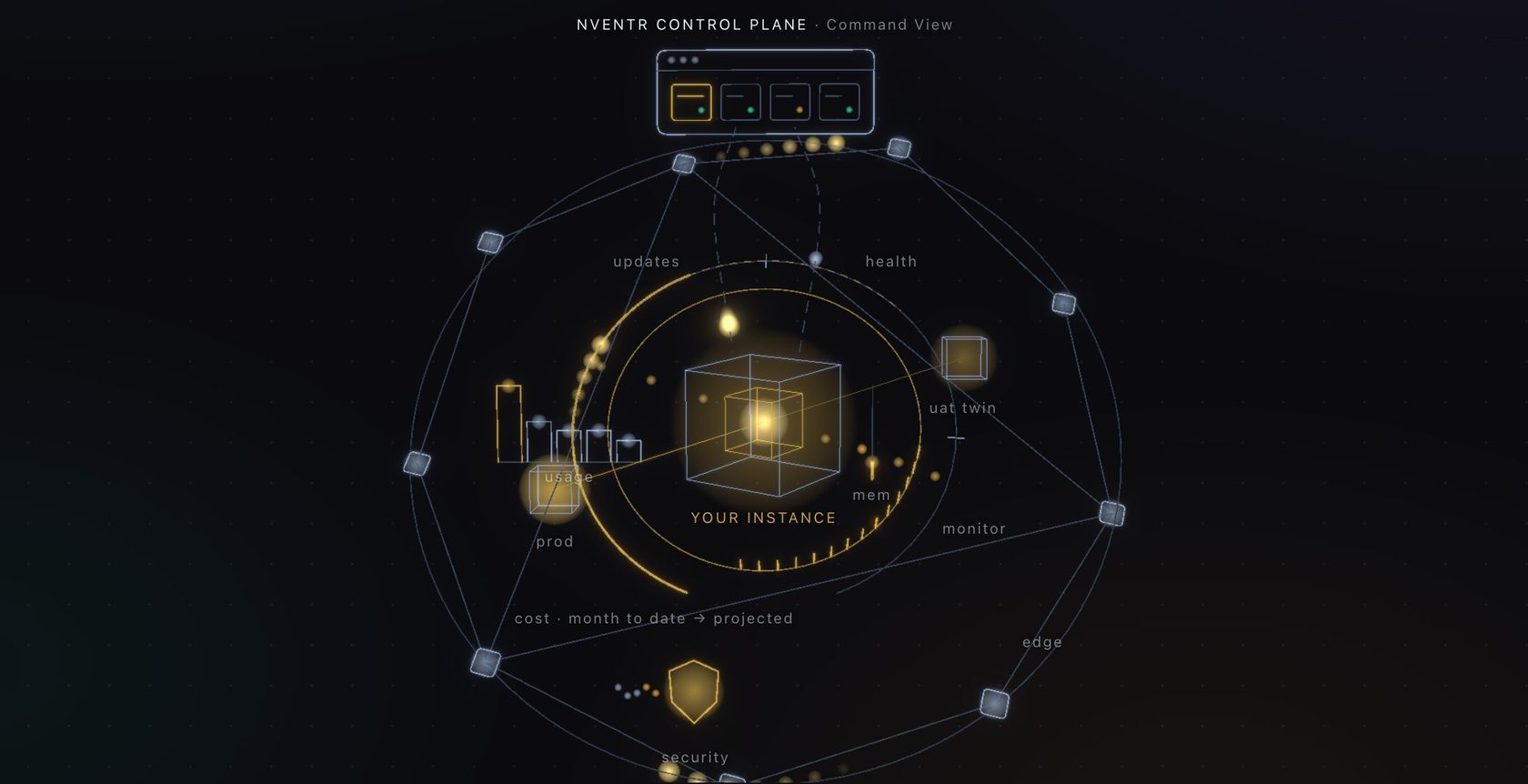
The instance is watched in three layers. Service health and HTTP feature checks come with the Kit rent. Browser flows and the monthly security baseline are the Assurance add-on. Talk to us for that add-on. Kit Site at $15 does not include any of this.
Included. We probe the app and its health URL from outside, the instance reports each of its services from inside, and an incident opens when either side fails. Uptime and latency sit on the instance.
A service that reports down twice in a row is restarted, with a cooldown and a daily cap. A production deploy whose checks start failing inside the window is rolled back to the previous build. Both appear under “Acted on its own” on the instance, and in the audit log.
A path can answer 200 while the feature behind it is broken. An HTTP check, included with Kit, looks for the status and the text you name, on a schedule, and only on your app. A browser check opens that page and waits for a selector. Browser checks are the Assurance add-on.
Assurance runs a monthly passive baseline — spider and passive rules, template checks, and the TLS handshake — and shows open finding counts on the instance. A deeper active test is a confirmed nventr engagement. It is not a button that fires attack payloads on a timer. Kit updates stay the rent. The scan is what the public surface still exposes.
Every instance gets the same sentries: health checked inside and out, security scans, feature checks, an edge with TLS, updates from the control plane, a UAT twin when you want one — and a fleet that restarts a down service or rolls back a bad deploy before you have read the page.
The kit ships one React application. Width changes the layout. A home-screen icon, when you want one, is that same build inside a store shell. Watch faces, widgets, and background audio stay outside this path — those are native extras, later, if a product needs them.
Full layout in Chrome, Safari, Firefox, or Edge. The address is the domain you bring, or the host that comes with the instance.
The same routes, refit for a narrow screen. Field staff open it in the mobile browser. There is no second app to keep in sync.
The in-between layout: lists stay readable, detail stays beside them. One stylesheet, three widths.
The same web build wraps in a Capacitor shell for the App Store and Google Play. A store release is a snapshot. The site at your domain updates on every deploy.
One Linux stack behind all of those clients. nventr hosts it, or it runs in your AWS, Azure, Google Cloud, or on-prem account.
A running product, assembled. You extend it at the seams — backend extensions, frontend extensions, and the entity registry — and the kit stays the platform underneath.
A React application your users sign into. Desktop, phone, and tablet share the routes. Auth is the session on the instance.
A Node API plus claim-based workers. A job is a document. A worker claims it, does the work, and writes the result back. Two tasks can overlap during a deploy without double-processing.
Postgres with sign-in, realtime, and row-level security. The data plane lives inside the instance, with the app.
S3-compatible object storage. Browsers upload large files straight to the bucket. Playback and download links are presigned.
Included with the Kit rent. The loop above — ask, review, deploy — is this console, at /dev. The other cards are what your users open.
Business knowledge stays in the database and is retrieved at answer time. On a kit instance, nQube runs inside this app. Org-wide pipelines into systems you already use are Platform.
Every instance is an MCP server. Cursor, Claude and ChatGPT connect at /api/mcp with a token or a sign-in and get the same record tools the in-app assistant has, under each member's own seat, every call audited.
You own everything you build, and you can leave with it. The export is a git bundle of your layer: pages, workers, entities, history, and your data. It contains none of the kit. It runs on the kit. If you stop renting, you keep that bundle and replace the foundation at the seams — backend extensions, frontend extensions, and the entity registry. A kit update cannot commit into your repo.
The foundation. You never edit it. A starter copy lands in your repo once.
Edits your repo only. A commit cannot contain kit code.
Your pages, workers, and data. Only the extension seams.
A git bundle of that layer, when you ask. The kit is not in it.
Must stay inside those seams, or the build stops. Then the pinned kit and your layer become one app.
Our host, or your cloud. License every 12 hours. Usage counts every 6. Content stays put.
The fee includes a managed host. Run the same instance in your cloud or on-prem and the license stays; compute, storage, egress, and GPU on our side drop off the bill. Phone, desktop, and the store shells still talk to that one instance.
We run the stack. TLS, backups, and deploys from the Dev Console are included in the license. This is the default.
The same compose file, in your account. Images are signed. You pull them. The license stays. Host meters on our side do not.
The stack runs on hardware you already have. The license stays. The browser and the store shells still reach it over your network.
Two channels, both counters and a license check. Content stays on the instance. A contracted perpetual license turns both channels off.
The instance confirms it is still entitled. Miss the window past the grace period and the stack stops. The grace period is tunable on the agreement.
Signed counts — runs, hours, storage — leave the box. Documents, files, and prompts do not. The signature is HMAC. The payload is the numbers.
$149/mo is that foundation, and Dev Console is part of it. Kit Site is $15/mo when you only need the public site. Desktop and phone in the browser are the product. A store shell would wrap that same build later. It is not a separate plan. Org-wide pipelines into systems you already use are Platform — a separate cart, or a written bundle.